Staff news: This article will contain a summary of useful updates you may see in your Blackboard Ultra courses from Friday 8th May 2026.
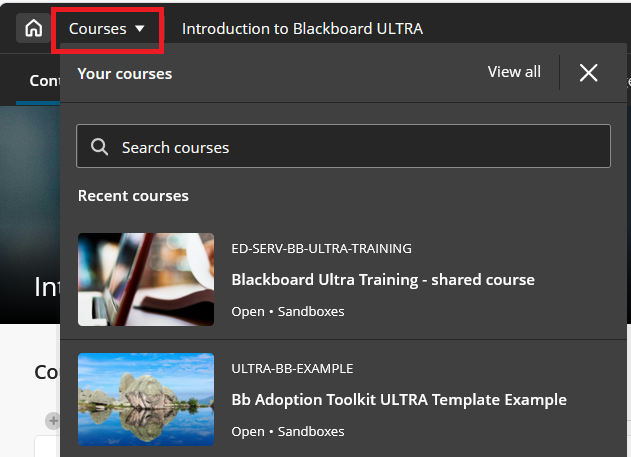
Search in the Course Switcher
You can now search for a course directly from the Course Switcher and navigate to it without first returning to the Courses page.
Carry group filter into Flexible Marking
The group filter selected in the Gradebook grid view now carries over into Flexible Marking. Markers who filter by a group in the Gradebook will find only the students from that group when they enter Flexible Marking.
White space improvements in Documents
Refined spacing and layout behavior in Documents to reduce unnecessary vertical white space and improve overall readability and visual balance.
Resized Accommodations icon
The Accommodations icon has been updated to a smaller size.
Improved screen reader experience in Document view mode
Screen reader users now have a cleaner, more focused experience when navigating documents in view mode. Unnecessary row and column announcements have been removed to allow access to primary content in the correct order, left to right, across rows, columns, and blocks. Edit mode behavior is unchanged.
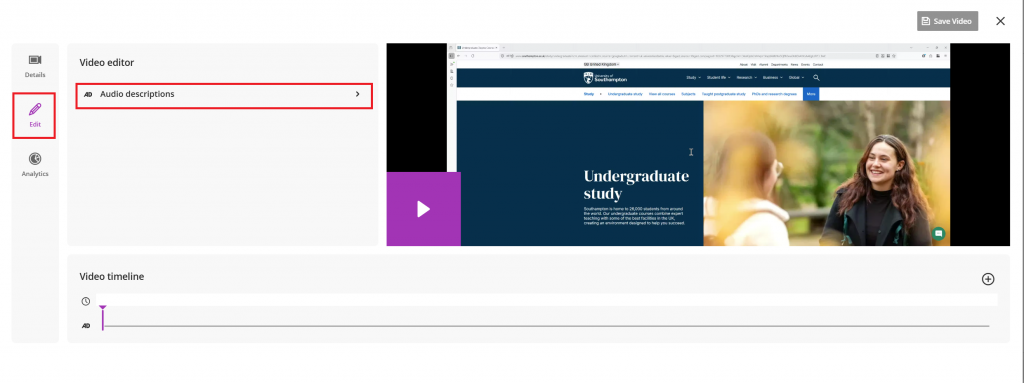
Add Audio Descriptions to Blackboard Videos
You can now add audio descriptions into Blackboard videos. However, we encourage the use of Panopto as your primary video tool. Panopto is available in the content market on Blackboard, and can be used by both staff and students.