
User Guide: To outline what the retirement of Original View Blackboard courses means for staff and students. Last Updated: 04/11/2026.
Why are Original Courses Retiring?
Blackboard Original Course View will no longer be supported by Blackboard after December 31, 2026.
At University of Southampton, we have already migrated all taught modules to Ultra Course View for teaching and learning as part of the Blackboard Ultra Migration Project which concluded in July 2026.
You can learn more about the Ultra Course View on the Course Preview page and learn about differences in the terminology between the two views on the Blackboard Original and Ultra Terminology page.
How does this impact me (staff)?
For the purposes of this process, we have grouped Blackboard Original Courses into 3 categories:
- Taught Course (Banner Module Course)
- Active Custom Course
- Inactive Custom Course
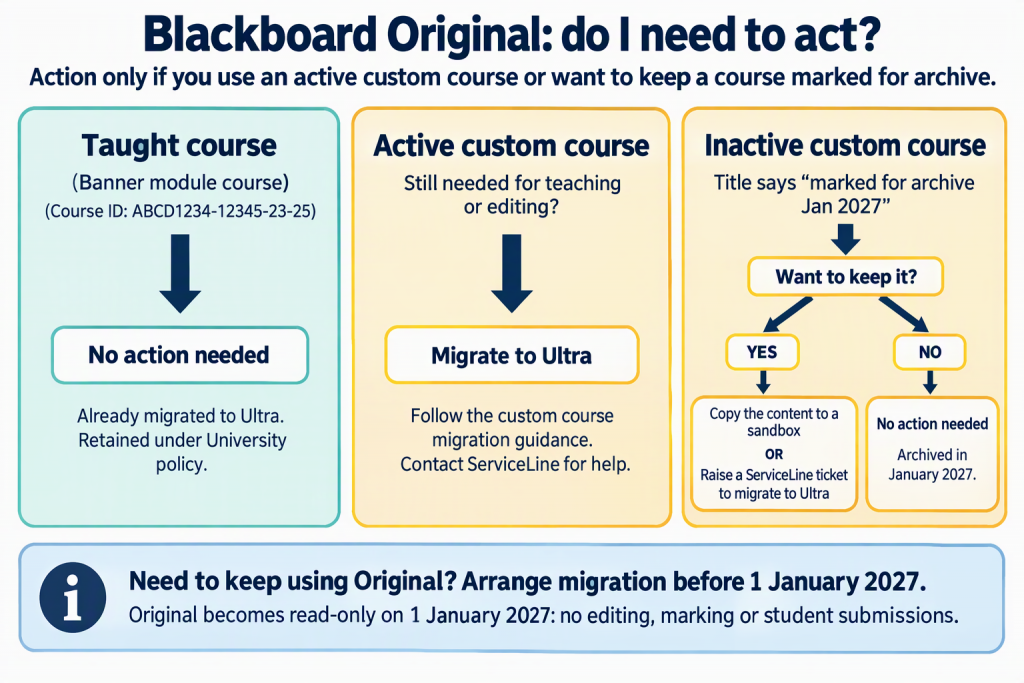
Taught Courses (Banner module courses)
All Banner linked taught courses have already migrated to Ultra. These courses (usually with a course ID: ABCD1234-12345-23-24) will be maintained as part of the University’s retention policy. Further information will follow about this in 2027.
Active Custom Courses
ISolutions are reaching out to around 200 active custom course owners (with student engagement and Gradebook submissions over the past 2 years).
If you are still actively using an Original Custom Course, raise a Serviceline Ticket for Blackboard Support Team.
Inactive Custom Courses – [Marked for archive Jan 2027]
We will be archiving inactive Original courses in January 2027. Review your course list for courses with Course Title edited to say [marked for archive Jan 2027]. If you want to keep the course content, there are two options:
- Copy content to an Ultra Sandbox retain the course content.
- Raise a Serviceline ticket if you would like to migrate this course to Ultra
Timeline: Original Course View end of life
Since 6th August 2026
Blackboard LMS displays the following message in courses for non-student roles, informing users that the Original Course View will no longer be supported:
This course is using the Original Course View, which will no longer be supported after December 31, 2026. On January 1, 2027, Original Course View courses will automatically be marked Complete and become read-only.
31st December 2026
This is the final day to make changes to courses using the Original Course View.
1st January 2027
All Original Course View courses are marked Complete by Blackboard.
All teaching, learning and communications must take place within Ultra courses.
1st January 2028
All Original Course View courses are converted to Ultra by Blackboard. More information about what this means will be communicated nearer the time.
FAQs
What does it mean when my Course is Complete and read-only?
You will still be able to access course data, run reports and download content, but an Original course cannot be changed from Complete status or used again for teaching. Complete/read-only courses can still have content copied out of them.
I have used my original course like a file store, it’s not active but there is lots on there?
Blackboard should not be used as a file store, we suggest downloading the content and saving it to your sharepoint. If you are testing materials, request a sandbox and copy the content over and you can then continue testing and re-use content in Blackboard more easily.
I have a module that is no longer being taught but I’d like to retain the course information.
All Taught courses will be saved according to our retention policy which states that courses may be archived/deleted 5 years after the last student completed the course.
Can students still access Complete courses?
Students will still be able to access all available teaching content on Complete Blackboard courses although they will not be able to submit assessments or interact with items such as discussion boards.
I don’t know if I need a custom course or sandbox
A Blackboard Course might not be the right place for content, read the Overview of Blackboard courses and how to request them.